
Shopping cart merupakan sebuah sistem dalam sebuah ecommerce yang berfungsi untuk menampung item dari product yang dijual sebuah ecommerce tersebut. Pada tutorial kursuswebprogramming kali ini kita akan belajar tentang Cara Membuat PHP Shopping Cart dengan jQuery Drag and Drop. Dalam tutorial ini, kita akan melihat contoh shopping cart. Dalam contoh ini, saya menambahkan produk ke keranjang dengan menggunakan jQuery drag and drop. Dalam tutorial sebelumnya, kami telah melihat shopping cart PHP dengan jQuery AJAX.
Dalam contoh ini, kita memiliki item produk yang dapat didrag. Saya menambahkan item ini ke keranjang dengan drag dan drop. Data produk yang dapat didrag dapat ditransfer ke PHP melalui request AJAX untuk melakukan tindakan shopping cart. Objek event drag digunakan untuk mengakses data ini selama penanganan event.
HTML Gambar Produk Draggable
Ini menunjukkan kode HTML untuk menampilkan daftar gambar produk dengan nama dan harga dari database. Kita bisa drag gambar ini dan masuk ke keranjang belanja DIV.
|
1 2 3 4 5 6 7 8 9 10 11 12 13 14 15 16 17 18 19 20 21 22 |
<div id="product-grid"> <div class="txt-heading">Products</div> <?php $product_array = $db_handle->runQuery("SELECT * FROM tblproduct ORDER BY id ASC"); if (!empty($product_array)) { foreach($product_array as $key=>$value){ ?> <div class="product-item" data-name="<?php echo $product_array[$key]["name"]; ?>" data-price="<?php echo "$".$product_array[$key]["price"]; ?>"> <div class="product-image"><img class="draggable" src="<?php echo $product_array[$key]["image"]; ?>" id="<?php echo $product_array[$key]["code"]; ?>"></div> <div><strong><?php echo $product_array[$key]["name"]; ?></strong></div> <div class="product-price"><?php echo "$".$product_array[$key]["price"]; ?></div> </div> <?php } } ?> </div> <div class="clear-float"></div> <div id="shopping-cart"> <div class="txt-heading">Shopping Cart <a id="btnEmpty" onClick="cartAction('empty','');">Empty Cart</a></div> <div id="cart-item"></div> </div> |
jQuery Drag dan Drop add-to-cart Action
Kode ini untuk menangani add-to-cart pada PHP Shopping Cart dengan jQuery Drag and Drop. Kode ini mendapatkan id elemen gambar draggable pada drag. Dengan referensi id, ini memicu tindakan AJAX addtocart pada event drop untuk memperbarui item keranjang dalam database.
|
1 2 3 4 5 6 7 8 9 10 11 12 13 14 15 16 17 18 19 20 21 22 |
$(document).ready(function() { $('.draggable').on('dragstart', function(e){ var source_id = $(this).attr('id'); e.originalEvent.dataTransfer.setData("source_id", source_id); }); $("#cart-item").on('dragenter', function (e){ e.preventDefault(); $(this).css('background', '#BBD5B8'); }); $("#cart-item").on('dragover', function (e){ e.preventDefault(); }); $("#cart-item").on('drop', function (e){ e.preventDefault(); $(this).css('background', '#FFFFFF'); var product_code = e.originalEvent.dataTransfer.getData('source_id'); cartAction('add',product_code); }); }); |
jQuery AJAX Cart Action
Kode ini memanggil basis permintaan AJAX pada action keranjang (add-to-cart, hapus-cart-item, keranjang-kosong) yang diminta oleh pengguna.
|
1 2 3 4 5 6 7 8 9 10 11 12 13 14 15 16 17 18 19 20 21 22 23 24 25 |
function cartAction(action,product_code) { var queryString = ""; if(action != "") { switch(action) { case "add": queryString = 'action='+action+'&code='+ product_code; break; case "remove": queryString = 'action='+action+'&code='+ product_code; break; case "empty": queryString = 'action='+action; break; } } jQuery.ajax({ url: "ajax_action.php", data:queryString, type: "POST", success:function(data){ $("#cart-item").html(data); }, error:function (){} }); } |
PHP Shopping Cart Actions
Kode ini mencakup fungsi sisi PHP yang dipanggil untuk permintaan AJAX. Ini memberikan kolom input untuk mengedit kuantitas untuk item keranjang yang ditambahkan.
|
1 2 3 4 5 6 7 8 9 10 11 12 13 14 15 16 17 18 19 20 21 22 23 24 25 26 27 28 29 30 31 32 33 34 35 36 37 38 39 40 41 42 43 44 45 46 47 48 49 50 51 52 53 54 55 56 57 58 59 60 61 62 63 64 65 66 67 68 69 70 71 72 73 74 75 76 |
<?php session_start(); require_once("dbcontroller.php"); $db_handle = new DBController(); if(!empty($_POST["action"])) { switch($_POST["action"]) { case "add": $productByCode = $db_handle->runQuery("SELECT * FROM tblproduct WHERE code='" . $_POST["code"] . "'"); $itemArray = array($productByCode[0]["code"]=>array('name'=>$productByCode[0]["name"], 'code'=>$productByCode[0]["code"], 'quantity'=>'1', 'price'=>$productByCode[0]["price"])); if(!empty($_SESSION["cart_item"])) { if(in_array($productByCode[0]["code"],$_SESSION["cart_item"])) { foreach($_SESSION["cart_item"] as $k => $v) { if($productByCode[0]["code"] == $k) $_SESSION["cart_item"][$k]["quantity"] = $_POST["quantity"]; } } else { $_SESSION["cart_item"] = array_merge($_SESSION["cart_item"],$itemArray); } } else { $_SESSION["cart_item"] = $itemArray; } break; case "remove": if(!empty($_SESSION["cart_item"])) { foreach($_SESSION["cart_item"] as $k => $v) { if($_POST["code"] == $k) unset($_SESSION["cart_item"][$k]); if(empty($_SESSION["cart_item"])) unset($_SESSION["cart_item"]); } } break; case "empty": unset($_SESSION["cart_item"]); break; } } ?> <?php if(isset($_SESSION["cart_item"])){ $item_total = 0; ?> <table cellpadding="10" cellspacing="1"> <tbody> <tr> <th><strong>Name</strong></th> <th><strong>Code</strong></th> <th><strong>Quantity</strong></th> <th><strong>Price</strong></th> <th><strong>Action</strong></th> </tr> <?php foreach ($_SESSION["cart_item"] as $item){ ?> <tr> <td><strong><?php echo $item["name"]; ?></strong></td> <td><?php echo $item["code"]; ?></td> <td><input name="quantity" value="<?php echo $item["quantity"]; ?>" size=3 onChange="calculateTotal(<?php echo $item["quantity"]; ?>,this.value,<?php echo $item["price"]; ?>);" /></td> <td align=right><?php echo "$".$item["price"]; ?></td> <td><a onClick="cartAction('remove','<?php echo $item["code"]; ?>')" class="btnRemoveAction cart-action">Remove Item</a></td> </tr> <?php $item_total += ($item["price"]*$item["quantity"]); } ?> <tr> <td colspan="5" align=right><strong>Total: </strong> $<div id="totalAmount" style="float:right;"><?php echo $item_total; ?></div></td> </tr> </tbody> </table> <?php } ?> |
Setelah menambahkan ke keranjang kita dapat mengubah kuantitas barang. Berdasarkan kuantitas yang dipilih, jumlah total dihitung secara dinamis. berikut scriptnya,
|
1 2 3 4 5 6 |
function calculateTotal(qty,qty_new,price) { var total = $('#totalAmount').html(); total = parseInt(total) - (parseInt(qty)*parseInt(price)); total = parseInt(total) + (parseInt(qty_new)*parseInt(price)); $('#totalAmount').html(total); } |
Berikut hasil dari coding di atas ;
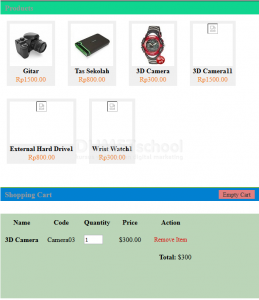
Oke untuk lebih jelasnya silahkan Anda pelajari sendiri, itulah tadi pembahasan saya tentang Cara Membuat PHP Shopping Cart dengan jQuery Drag and Drop semoga bermanfaat.